Master Your Leads: How AUTO.AE Helps Showrooms Manage Every Customer Inquiry
•399 views
On AUTO.AE, leads are the lifeblood of your showroom. Whether it’s a request to buy, rent, or get a callback, having a single place to see, manage, and act on every inquiry is critical.
The Leads section in your AUTO.AE Business dashboard is designed to do exactly that — turning interest into action.
📋 What You See in the Leads List
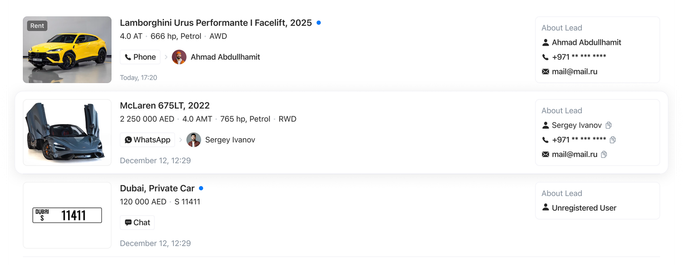
The Leads page displays every customer inquiry in detail, giving you full visibility of your potential buyers.
For each lead, you can view:
- Vehicle information: brand, model, year, key specifications, price
- Contact channel: phone, WhatsApp, or chat
- Customer name
- Date and time of the request
- Additional info: whether the customer is a registered user and their contact details
Examples include:
- McLaren 675LT, 2022 via WhatsApp
- Lamborghini Urus Performante I Facelift, 2025 via phone
Having all of this information in one place allows your team to prioritize leads and respond quickly.
🔍 Filters and Sorting — Find the Leads That Matter
With potentially dozens of leads every day, the ability to filter and sort is crucial. AUTO.AE provides flexible options:
- By date: Today, last 7/14/30 days, past month, or year
- By contact type: Phone, chat, WhatsApp
- By manager: Assign leads to specific salespeople
- By vehicle: Brand or model
These filters make it easy to find high-priority leads and track performance over time.

⚡ Actions You Can Take With Leads
Once a lead is identified, AUTO.AE provides quick ways to act:
- Read All: Mark multiple leads as read at once
- Quick contact buttons: Phone, WhatsApp, or email links for instant communication
- Direct links to vehicle pages: See the listing the customer inquired about
This streamlined workflow ensures no inquiry slips through the cracks and allows your team to respond professionally and efficiently.
📈 Why Showrooms Benefit from the Leads Page
The AUTO.AE Leads section isn’t just a list — it’s your central command for customer engagement:
- All inquiries in one place— no more scattered messages
- Filter and prioritize — focus on high-value leads first
- Quick contact options — connect instantly with interested buyers
- Track and analyze — monitor performance by date, vehicle, or manager
In short, it transforms raw customer interest into actionable opportunities and faster deals.
AUTO.AE — Your Showroom’s Control Center
Whether it’s selling, renting, or arranging callbacks, AUTO.AE Business → Leads keeps your team organized, responsive, and efficient.
By using this page effectively, you:
✔ Stay on top of every customer request
✔ Reduce response times
✔ Increase conversion rates
✔ Improve customer satisfaction
Manage your leads smarter — and turn every inquiry into a potential sale.