Never Miss a Lead: How Callback Requests Help You Close More Deals on AUTO.AE
•443 просмотра
On AUTO.AE, we don’t just help you publish listings — we help you turn interest into real conversations.
One of the simplest yet most powerful tools available in your AUTO.AE Business dashboard is the Callback Request feature.
It allows potential buyers to request a phone call directly from your vehicle listings — and gives your showroom a structured space to manage those leads efficiently.
Let’s explore how it works and why enabling it can significantly increase your sales opportunities.
📞 Why Callback Requests Matter
Not every customer wants to fill out long forms.
Many serious buyers prefer something simple: “Call me.”
When a client requests a callback:
- They are already interested in a specific vehicle
- They are ready to speak directly
- They expect fast communication
- They are closer to making a decision
This is one of the warmest types of leads you can receive.
📋 Callback Leads — All in One Place
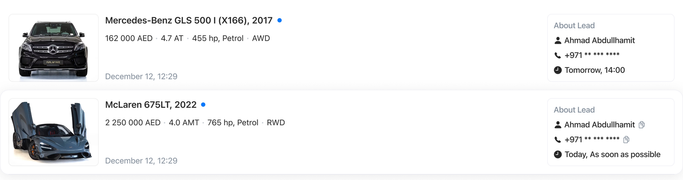
Inside AUTO.AE Business → Callback, you’ll find a dedicated section for managing callback requests.
Here, you see a structured list of customers who have requested a call regarding your listings.
For example:
- Mercedes-Benz GLS 500 I (X166), 2017 — Status: Waiting for a call
- McLaren 675LT, 2022 — Status: Waiting for a call
For each lead, you can view:
- Vehicle name
- Date and time of the request
- Customer name (if provided)
- Phone number
- Preferred timing (e.g., As soon as possible)
- “Call” button for immediate action
This gives your team everything needed to respond quickly and professionally.
🚀 Why Fast Response Increases Sales
In the automotive market, speed matters.
The first showroom to call often wins the deal.
With the Callback section, you:
- Clearly see which leads are waiting
- Avoid losing inquiries in messages or emails
- Keep communication organized
- Improve internal workflow for your sales team
It’s a simple system — but it directly impacts your closing rate.
⚙ Callback Settings — Full Control in Your Hands
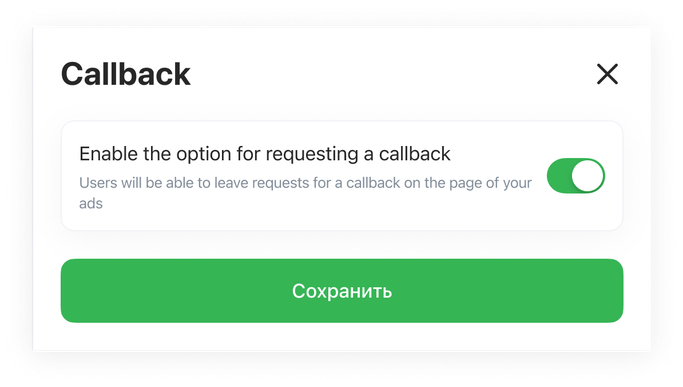
Below the lead list, you’ll find the Callback Settings section.
There is a simple option:
Enable the option for requesting a callback
When enabled:
✔ Users can request a callback directly from your vehicle pages.
When disabled:
✖ The callback request option is not visible in your listings.
After making changes, simply click Save.
No technical setup. No integrations. Just one checkbox.
📈 Why Showrooms Should Activate Callback Requests
1. Capture High-Intent Buyers
A callback request means the customer wants direct communication.
2. Increase Trust
Offering a call option shows transparency and availability.
3. Shorten the Sales Cycle
Direct conversations close deals faster than text messages.
4. Improve Customer Experience
Some buyers prefer speaking over typing — give them that option.
5. Stay Competitive
Listings with easy contact options generate more engagement.
AUTO.AE — Turning Interest Into Real Conversations
The Callback feature is more than a contact form.
It’s a direct bridge between your showroom and motivated buyers.
By enabling callback requests in your dashboard, you:
✔ Increase real-time communication
✔ Improve response speed
✔ Generate warmer leads
✔ Boost your chances of closing deals
Activate Callback Requests in your AUTO.AE Business account today — and make sure no interested buyer is left waiting.